
LDOCE Plus14.1.2 - App Store
You'll be able to see results in few seconds.
Publisher Description

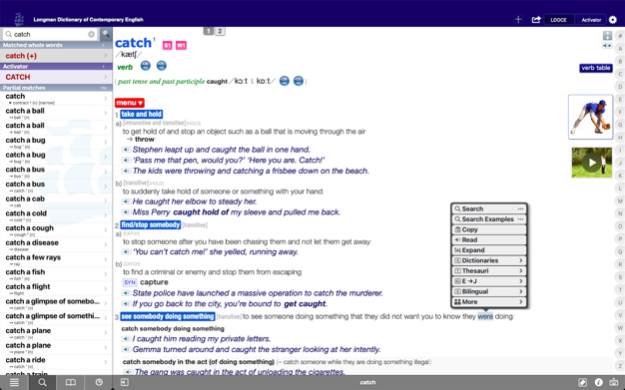
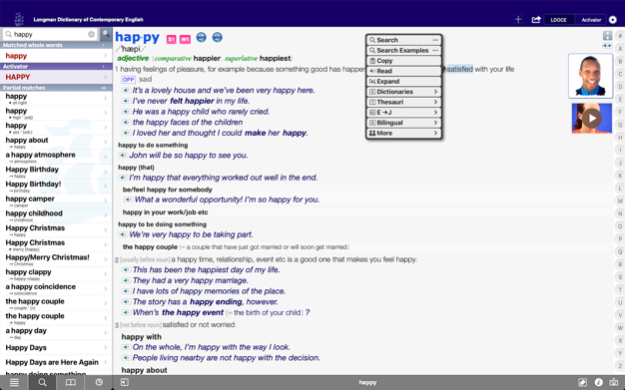
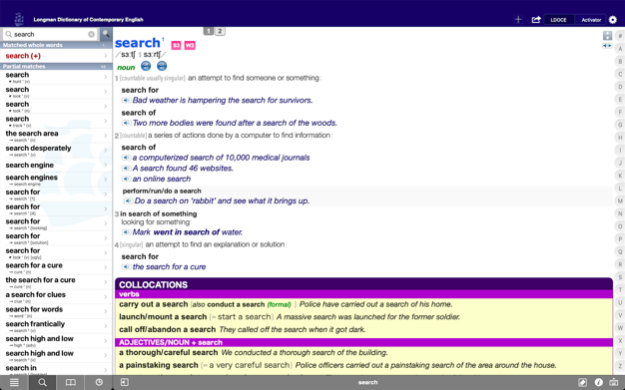


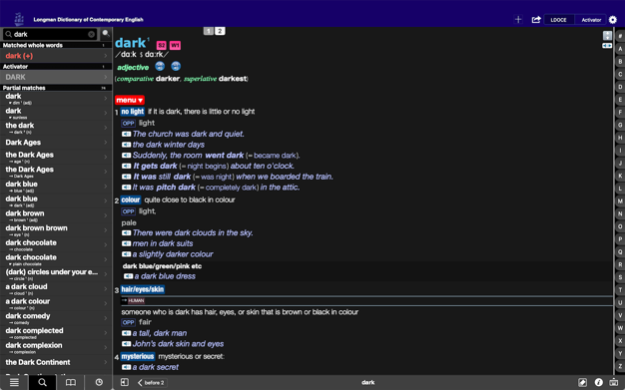
More features than any other dictionary app available!
And the most "connected" dictionary app on macOS and iOS -works together with more third-party dictionaries and apps than anyone else.
Longman's flagship learner’s dictionary PLUS the Longman Activator Thesaurus
___________________
The ultimate learner's resource of the English language for use anywhere and anytime.
Are you looking to increase your English vocabulary? Do you have difficulty deciding on the correct word to use in a particular situation? Then the Longman Dictionary of Contemporary English PLUS Longman Activator Thesaurus is the app for you.
The Longman Activator Thesaurus is a thesaurus for learners of English – and unlike a traditional thesaurus, it provides full explanations of all words and phrases so that you truly understand the differences between them. For this reason, the Longman Activator Thesaurus has been described as “better than a thesaurus”!
LDOCE Dictionary details:
● 230,000 words, phrases and meanings - more than any other learner's dictionary
● 165,000 examples based on real, natural English from the Longman Corpus Network
● 10,000 encyclopedic entries -people and places.
● Clear definitions written using only 2,000 common words
● Full IPA phonetic transcriptions for all words
● 5,000 verb conjugation tables
● Over 3000 images and 120 videos to explain meanings at a glance
● Most frequent 3,000 words in spoken & written English highlighted for you
● Register Notes focus on the differences between spoken and written English.
● The Academic Word List is highlighted to help you improve your essays and presentations.
● Grammar and warning notes ensure that you avoid the most common errors.
● Integrated Collocations Dictionary. Over 80,000 collocations will improve your fluency.
● Integrated Thesaurus.
-Over 20,000 synonyms, antonyms and related words will improve your vocabulary range.
86,000 pronunciation files
—all headwords in both UK & US accents
another 86,000 recorded example sentences
—via external links. Over 20GB of audio!
Activator Thesaurus details:
+ 866 keywords – basic words that you already know
+ Over 22,000 words and phrases
– all fully explained and illustrated with example sentences
+ Full index for quick look-up of words or phrases
+ Over 15,000 audio pronunciations in British & American English
+ Full IPA phonetic transcriptions for all words and phrases
+ Over 400 images
Making this the largest resource for English learning available on ANY mobile platform!
___________________
Application Features:
● full contents of the print dictionary
- PLUS additional collocations, synonyms & word histories
● complete front matter & additional resources
● unique three-way cross-referencing search
● real-time progressing look-up
● wildcard pattern searches -with * ?
● spelling suggestion dictionary included
● hyperlinking directly to meanings & appendices
● example sentence search
● search on idioms & phrasal verbs
● search on synonym & "sign-post" meanings
● Bookmarks with folders and editable notations
● Bookmark syncing via iCloud
● automatic history listing
● search from other applications via a public API
● Flashcards to test yourself
● Teacher's resources in PDF for printing or email
● "Word-of-the-Day" sets including TOEIC® & TOEFL®
● OS-independent app localization
● DarkMode support
● search from other applications via a "Services" menu item
● iPhone, iPod, iPad and macOS support
___________________
Social Media:
● Full layout for definition emails & Evernote posts.
___________________
Copyright:
Longman Dictionary of Contemporary English
© Pearson Education Limited 2015
Longman Activator Thesaurus, Second Edition
© Pearson Education Limited 2002
Mar 13, 2023
Version 14.1.2
Complete update to localizations.
Fixes for Bookmarks.
About LDOCE Plus
The company that develops LDOCE Plus is English Channel, Inc.. The latest version released by its developer is 14.1.2.
To install LDOCE Plus on your iOS device, just click the green Continue To App button above to start the installation process. The app is listed on our website since 2023-03-13 and was downloaded 0 times. We have already checked if the download link is safe, however for your own protection we recommend that you scan the downloaded app with your antivirus. Your antivirus may detect the LDOCE Plus as malware if the download link is broken.
How to install LDOCE Plus on your iOS device:
- Click on the Continue To App button on our website. This will redirect you to the App Store.
- Once the LDOCE Plus is shown in the iTunes listing of your iOS device, you can start its download and installation. Tap on the GET button to the right of the app to start downloading it.
- If you are not logged-in the iOS appstore app, you'll be prompted for your your Apple ID and/or password.
- After LDOCE Plus is downloaded, you'll see an INSTALL button to the right. Tap on it to start the actual installation of the iOS app.
- Once installation is finished you can tap on the OPEN button to start it. Its icon will also be added to your device home screen.
Program Details
System requirements
Download information
Pricing
Version History
version 14.1.2
posted on 2023-03-13
Mar 13, 2023
Version 14.1.2
Complete update to localizations.
Fixes for Bookmarks.
version 13.2.2
posted on 2022-03-17
Mar 17, 2022 Version 13.2.2
Added menu item for zooming definition pages.
version 13.2
posted on 2022-02-25
Feb 25, 2022
Version 13.2
Upgraded pronunciation sound quality from 8KHz to 44KHz
Upgraded our server hardware. Doubled the number of servers and added Amazon S3 failover.
Example sounds now download faster.
Adds a Zoom In and Out menu item.
version 13.1
posted on 2022-01-27
Jan 27, 2022 Version 13.1
Better iCloud syncing.
Adds a selectable interface for Bookmark restores.
Adds customization to the Link Menu.
version 13.0.1
posted on 2022-01-07
Jan 7, 2022 Version 13.0.1
Adds sound support on macOS 10.15 Catalina
version 13.0
posted on 2021-12-23
Dec 23, 2021 Version 13.0
UI & graphics updated.
Bookmarks are now automatically restored after the app is deleted and reinstalled. (Turn on iCloud Sync setting for this)
Manual Bookmark iCloud restore is now smarter.
version 12.1.5
posted on 2021-12-10
Dec 10, 2021 Version 12.1.5
Fix in licensing
version 12.0.3
posted on 2021-11-17
Nov 17, 2021 Version 12.0.3
Fix for macOS 10.x
version -
posted on 2021-11-11
version 12.0.2
posted on 2021-11-11
Nov 11, 2021 Version 12.0.2
Fix for macOS 10.x
Disclaimer
Official App Store Link
We do not host LDOCE Plus on our servers. We did not scan it for viruses, adware, spyware or other type of malware. This app is hosted by Apple and passed their terms and conditions to be listed there. We recommend caution when installing it.
The App Store link for LDOCE Plus is provided to you by apps112.com without any warranties, representations or guarantees of any kind, so access it at your own risk.
If you have questions regarding this particular app contact the publisher directly. For questions about the functionalities of apps112.com contact us.
